Showing posts with label platform. Show all posts

Thursday, July 29, 2010

Driver Version xxx.xx stopped responding and has successfully recovered

I have been receiving this message a lot when running Revit 2011 on a Dell Latitude with 8gigs of ram, Windows & (64bit) and a Nvidia v3100m graphics card.

Display Driver Nvidia Windows Kernel Mode Driver Version xxx.xx stopped responding and has successfully recovered

Error Messaging

What normally happens, is that I will be happily working away in Revit 2011 then suddenly the screen with go black; a little disconcerting; next a message box will appear in the bottom left had corner of the screen with the above message. Revit doesn’t crash, but you do notice that the graphics will be rather sluggish. A save and restart of Revit resolves the problem. It would seem that this crash is as intended, even though very annoying, this statement refers to something called a TDR. A TDR or Timeout Detection and Recovery is a feature that attempts to detect problematic situations and recover to a functional desktop automatically. This feature first appeared in Windows Vista, but it tries to keep the OS going without freezing the PC and forcing a restart.

One issue is that this particularly laptop does not have certified graphic card drivers, it certainly doesn't appear on the Autodesk graphic card list. I have tried drivers from the Nvidia website, but this hasn’t helped. So after a bit of digging around on the internet last night, it was suggested that if you turned off the Windows 7 icandy and actually run in Windows classic mode it would stop the issue. I have been trying this for the 12 hours now and so far……the issue hasn’t returned.

Friday, May 07, 2010

Revit and Newforma

HOK are big users of Newforma. If you are looking for a document management system which seamlessly fits into workflow with no disruption to your existing processes  you need to checkout Newforma. People often ask me about Newforma, “Why is it so special, what does it off that other systems don’t already provide"?” To be honest I could write a book on what it provides, but one thing is for sure, it does exactly what it says on the tin. That’s its beauty.

When I worked for an Autodesk reseller I got to see many different document management systems. My general opinion was that most where geared towards a manufacturing / engineering. The AEC industry is different and whilst it may seem to make sense that some of these system could work or be adapted, their rigid nature just didn’t allow them to work very efficiently in a AEC firm. So if you either already using Newforma are interested in what it has to offer obviously checkout the Newforma website, but also read this article on AECbytes which explains how PCS Structural Solutions are using Revit Structure and Newforma together.

http://www.aecbytes.com/tipsandtricks/2010/issue48-newforma.html

Wednesday, April 08, 2009

Revit 2010 opinion poll

I would like to thank everybody who voted on the recent Revit 2010 opinion poll. As the poll is now closed, these are the results and it makes interesting reading. This is an extremely small snap shot of what is an ever growing Revit community and Autodesk may not be that concerned to be honest, but it does highlight a couple of points.

On the question relating to "What do you think of Revit 2010?", we had a total of 60 votes.

  • 42% (23) Thought this was great release.
  • 20% (12) Thought this was a awful release.
  • 38% (25) Thought this is a good release, but Autodesk missed an opportunity.

chart 1

On the question relating to "Will your company deploy Revit 2010?", we had a total of 55 votes.

  • 55% (30) said "Yes" they would deploy 2010.
  • 18% (10) said "No", they would not deploy 2010.
  • 27% (15) said "Not Sure" whether they will deploy 2010.

chart 2

The majority of those that responded, 42%, thought this was a great release. But 38% thought although it was a good release, but once again Autodesk had missed an opportunity. Now my view on this is that some of the on going issues such as text editing, stairs, railings, site etc could have been resolved. However, I guess these are big projects internally to the development team and will take time to address, but to be honest I don't believe a good quality text editor can be that difficult to implement?? I am sure this would have helped many of the user base who just use Revit as it was intended, a BIM documentation tool. 20% thought that 2010 was a awful release!

More worryingly was the answers relating to whether your company will deploy Revit 2010.The majority that responded, 55%, said that they would deploy 2010. But 18% said that they wouldn't. Is this signs of a worrying new trend? My experience over previous releases has been that users can't wait to get their hands on the new release. Are we starting to move into an update every other year mentality which seems to haunt AutoCAD? I hope not, but I do wonder if the interface overhaul has been too much for some to stomach? The new UI will evolve. When the Ribbon UI first appeared in AutoCAD 2009 it received similar complaints by users, some liked it, others hated it. However, in the case of AutoCAD at least you could enable a classic mode. The AutoCAD 2010 releases sees modifications and improvements to the UI which fine tunes it, I'm guessing this will happen with Revit, which is possibly why some are considering waiting until 2011. There is a cost to deploying software and this release will probably be the most costly for firms to deploy. When bottom lines and productivity are being watched so carefully CAD managers / IT directors are probably considering the value of the move to 2010.

I guess its a question of inevitability. Eventually you will have to make the leap to the new UI, if you decide to stay on the Revit platform. I'm sure users will complain and you will be rushed off your feet preparing new training material, deployment plans, resolving support issues etc, but at least by the time 2011 arrives you can focus on new features again, rather than worrying about where your tools have disappeared to.

Tuesday, May 06, 2008

Revit 2009 and 64bit

I've been asked a couple of times already whether there is a 64bit version of Revit 2009. As it standards the answer is "no". You will find this posted on Autodesk's support web pages which confirms this....

http://usa.autodesk.com/adsk/servlet/ps/item?siteID=123112&id=11220239&linkID=9243182&CMP=OTC-RSSSUP01

However, Revit 2009 products will happily run on 64bit operating systems such as XP64 and Vista 64, thus making use of as much RAM as you can fit in your machine! I have just taken possession of HP workstation with a 3ghz dual core 2 processor, fx370 graphics card, a stripped 500gig Sata hard drive, 8gigs of RAM and Vista 64bit business installed. Once I've got it up and running and Revit is installed, I'll share my experiences.

Tuesday, March 11, 2008

Revit and Windows Vista

When Revit Architecture 2008 was released I got excited when I found out that it would be supported under Windows Vista, however on trying it out I was disappointed by the results and continued to run Revt in an XP environment.

Since the initial release of 2008, Autodesk have provided us with a number of new builds and it would seem that in my view, Revit performance has got better under Vista. So I decided to revisit the Vista operating system a few months back. What I have discovered whilst using Revit Architecture 2008 in a Vista environment is that it’s worth doing a few tweaks to the interface to improve performance. My laptop is a Dell M65 4gigs of RAM, 2.33ghz Centrino Duo with a 512mb Nvidia graphics card. Whilst this spec may seem high, its run of the mill these days, you only need to take a quick look at the Dell website to check out the latest specs. Vista is memory hungry so it’s worth adding 4 gigs of RAM if you can afford it and enabling the 3 gig switch. Enabling the 3gig switch in Vista is different compared with setting this up in Windows XP. Guidance on how to do this can done can be found at the following two web sites. If you are running Vista 64 you won’t need to worry about this.


It is defiantly worth making sure that your graphics card supports OpenGL under Vista and that you have the latest drivers. Whilst OpenGL in Vista is only an overlay to DirectX, if you use shadows a lot, a graphics card which supports OpenGL is essential.
I have also discovered that Revit seems to perform better without the Aero interface turn on. If you are not using OpenGL graphics it doesn’t seem to make a lot of difference, but with OpenGL enabled in Revit and the Aero interface turned on you seem to get screen corruption. I have certainly encountered this.

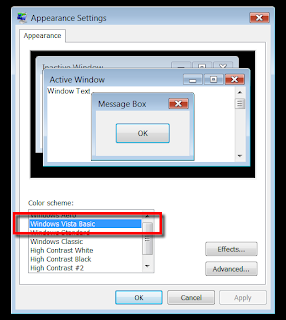
To disable the Aero interface; Right-click the desktop > Personalize > Windows Colour and Appearance and choose Windows Vista Basic.

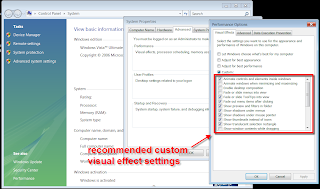
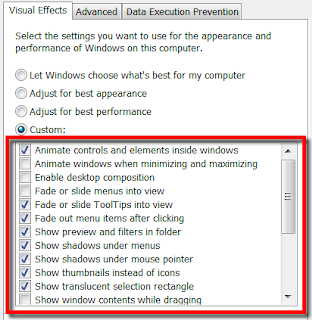
It’s also worth adjusting the visual effects; these are the ones I use, which still give me the Vista look and feel whilst retaining performance.

Disabling transparency also seems to help: Right-click the desktop > Personalize > Windows Colour and Appearance. Uncheck Enable Transparency > OK.
Disable the annoying side bar also seems to help: If you don't use it, get rid of it -- it's just eating system resources. Right-click the Sidebar > Properties > uncheck Start Sidebar When Windows Starts > OK. Then, right-click the Sidebar > close Sidebar. If you want it back, click Start > type "sidebar" and press Enter.

I found most of the performance information I required at these two sites, however I am sure you will find additional information spread across the internet.


These are only my finding and I am sure others may have had better or even worse experiences than me. However, Windows Vista service pack 1 will be with us in the next few months and I am sure this will improve performance even further. To top that, from what I am seeing, the performance of Revit Architecture 2009 under Vista is even better than the Revit Architecture 2008.

Friday, September 28, 2007

Revit on the Mac

This is often a hot topic on the Revit AUGI forums and it some times gets very heated! Whats better, Mac or PC? Well, I've been a long term Mac user as well as a Windows PC user. My first computer was a Macintosh LCII, if anybody can remember one of those? I've worked for companies which have used both platforms. I personally love the Mac environment, but I have learned to get on with PC's and the Windows platform. These days I don’t got too bothered about the platform wars, because to me its just an interface to your hardware, Revit as a BIM platform excites me more.

I meet a lot of architects and designers in my role and I have lost count how many have asked whether Revit runs on the Mac. A lot of architects still use Mac's, its just one of those design things. I live near Winchester, Hampshire,UK and this is a strong hold for architectural firms. I'd go as far as to say that over half of these are Mac users running Vectorworks. I'd love to see Autodesk port Revit to the Mac, but commercially I don’t think its viable, well that’s what Autodesk insiders have told me in the past.

However, the landscape has now changed and it all comes down to the fact that all current Apple hardware are based on Intel processors rather than the aging PowerPC. If anybody attended AU last year they will have noticed that Phil Read of Autodesk Consulting fame presented his Advanced Revit session on a Macbook Pro using Bootcamp, which allows him to boot between Mac OS X and Windows, so that he can run Revit on his Macbook.

Also, a company called Parallels Inc introduced virtualization software last year which allows you to run Mac OS X and Windows side by side. What is interesting is that the latest version of Parrallels has DirectX and OpenGL support, even going as far as saying on their website that Revit Architecture 2008 has been tested and works. I haven’t tried it myself, but I know a number of architects as well as Engineers who are working with Parrallels on a Mac and are more than happy with the performance.

http://www.parallels.com/en/products/desktop/features/3d/

If you need to know more, its worth reading this article on Aecbytes from Scott Onstott as he has recently migrated from Windows to using Parrallels on a Mac Book Pro.

http://www.aecbytes.com/tipsandtricks/2007/issue22-WinonMac.html

So in summary, Revit will work on a Mac!! With that in mind, I know my next laptop will be a Macbook Pro. :-)